How antivirus software actually works
Advertising disclosure
This page contains a partner link. If you subscribe to a product after following it, CLEANING SERVICES HAIOSH s.r.o. receives a commission from the vendor, at no extra cost to you. It does not change what this page says: no advertiser reviews our text before publication. See the full disclosure and our editorial policy.
Trademark notice: this site is independent and is not affiliated with, endorsed by or sponsored by any brand named here. All trademarks belong to their owners.
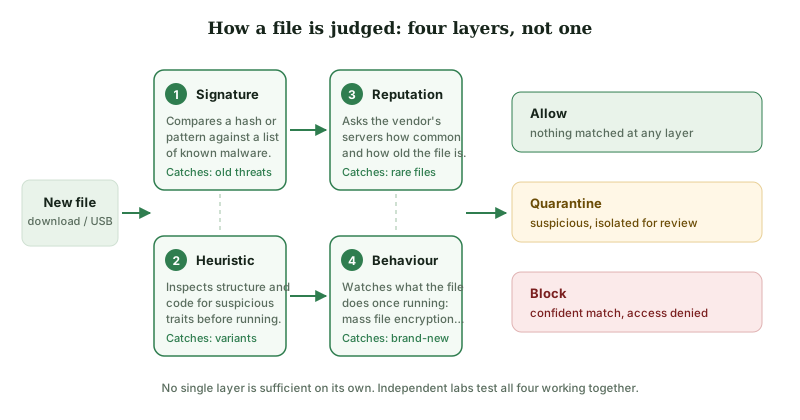
"Antivirus" describes four different mechanisms working together, not one. Knowing which is which explains why laboratory scores differ between products, why false positives happen, and why no product ever reaches one hundred per cent.
The four layers
1. Signature matching
The oldest technique, and still the fastest. The scanner computes a hash of the file, or looks for a distinctive byte pattern inside it, and compares the result with a list of fingerprints of known malware. If the fingerprint matches, the verdict is certain.
The weakness is structural: a signature can only describe something the vendor has already analysed. Changing a single byte in a malicious file changes its hash, and automated toolkits produce thousands of fresh variants a day for exactly this reason. Signatures remain useful because old malware never disappears — but they cannot be the whole answer.
2. Static heuristics
Rather than asking "have I seen this exact file", heuristic analysis asks "does this file look like the kind of thing malware is". It examines the file without running it: how it is packed and compressed, which system functions it imports, whether its code is obfuscated, whether a document contains a macro that reaches out to the network.
This generalises to variants of known families, which signatures cannot do. It is also the main source of false positives — legitimate software that is packed, self-updating or unusual can trip the same rules. That trade-off is why laboratory reports always publish a false-positive count alongside the detection rate, and why a product with a perfect detection score and a terrible false-positive score is not a good product.
3. Reputation and cloud lookup
The scanner asks the vendor's servers what is known about this exact file: how many other installations have seen it, how long it has existed, whether it is digitally signed and by whom.
The logic is statistical rather than analytical. A signed binary that has been on millions of machines for two years is almost certainly fine. An unsigned executable that appeared forty minutes ago and has been seen on three machines worldwide deserves suspicion, even if nothing in it is recognisably malicious. This is also why obscure but legitimate software — a small developer's utility, a freshly compiled program — sometimes gets flagged.
4. Behavioural monitoring
The final layer watches what a program does once it runs: enumerating documents and rewriting them in bulk, injecting code into another process, installing itself into a startup location, disabling recovery options, contacting a command server.
This is the layer with a real chance against something genuinely new, because behaviour is harder to disguise than appearance — ransomware must encrypt files to be ransomware. It is also the layer that costs the most performance, and the one people disable when a game stutters. That is precisely backwards: it is the layer that responds to threats nobody has catalogued yet.
Why nothing reaches one hundred per cent
Detection is an adversarial problem. On one side are defenders writing rules; on the other, people who can buy the same products, test their creations against them, and keep adjusting until they get through. Every rule that catches more malware also catches more innocent software, and every rule tuned to avoid false positives lets a little more through. There is no setting at which both numbers are zero.
This is why security professionals talk about layers rather than products. A scanner is one control among several: patched software, a browser that warns about phishing pages, unique passwords, two-factor authentication on your e-mail, and a backup that is not permanently plugged in.
What your computer already does
Current versions of Windows include Microsoft Defender Antivirus, enabled by default, with real-time protection and cloud-delivered updates; it is submitted to the same independent laboratory rounds as commercial products. macOS includes Gatekeeper, which checks that applications are signed and notarised, and XProtect, Apple's built-in signature system. Chrome, Edge, Firefox and Safari all check downloads and addresses against reputation services.
A paid product is therefore rarely a choice between "protection" and "no protection". It is a choice about whether you want a different engine, cross-platform coverage on one bill, and extras such as a VPN and a password manager bundled in. Our main article works through that trade-off in detail.
How to read a laboratory report
Three organisations publish comparable, methodologically documented consumer testing: AV-TEST (Germany), AV-Comparatives (Austria) and SE Labs (United Kingdom). Their reports are free. Four things to check:
- The date. Engines change. A certificate from three years ago tells you little about today's product.
- Whether the product was in the round at all. Participation is voluntary and vendors choose which tests to enter. Absence from a table is not a failure — it is absence. It also means a vendor can advertise the rounds it did well in.
- The false-positive column. Always read it next to the detection rate.
- The test type. "Real-world protection" tests run the whole chain from web page to payload, which is how infections actually arrive. Static file-detection tests measure something narrower.
Terms you will meet
| Zero-day | A vulnerability or threat for which no fix or signature yet exists. Behavioural monitoring is the layer aimed at these. |
|---|---|
| Heuristic | A rule of thumb that generalises from known-bad traits rather than matching a known-bad file exactly. |
| False positive | Legitimate software wrongly flagged as malicious. |
| Quarantine | A suspicious file moved to an isolated store where it cannot run, but can be restored if the verdict was wrong. |
| PUP / PUA | Potentially unwanted program or application — adware, bundled toolbars, aggressive "optimisers". Not malware in the strict sense, and often reported separately. |
| Sandbox | An isolated environment in which a file can be run and observed without reaching the real system. |
| EDR | Endpoint detection and response — an enterprise category focused on investigating and containing incidents, not a consumer feature. |
Sources
- AV-TEST Institute — av-test.org
- AV-Comparatives — av-comparatives.org
- SE Labs — selabs.uk
- Microsoft, Microsoft Defender Antivirus documentation — learn.microsoft.com
- Apple Platform Security guide — support.apple.com
Found an error? Write to info@krasovin.online. Our corrections procedure is public.